
← All case studies
Unified Inbox
Two ways to work. One inbox.
A unified workspace for email, SMS, OTA messaging, and internal notes, designed to move the product forward without breaking how people already work.
My role
Design lead: direction and reviews
Team
Me + 1 designer, with product owners
Platform
Web, responsive
Channels
Email, SMS, OTA, internal notes
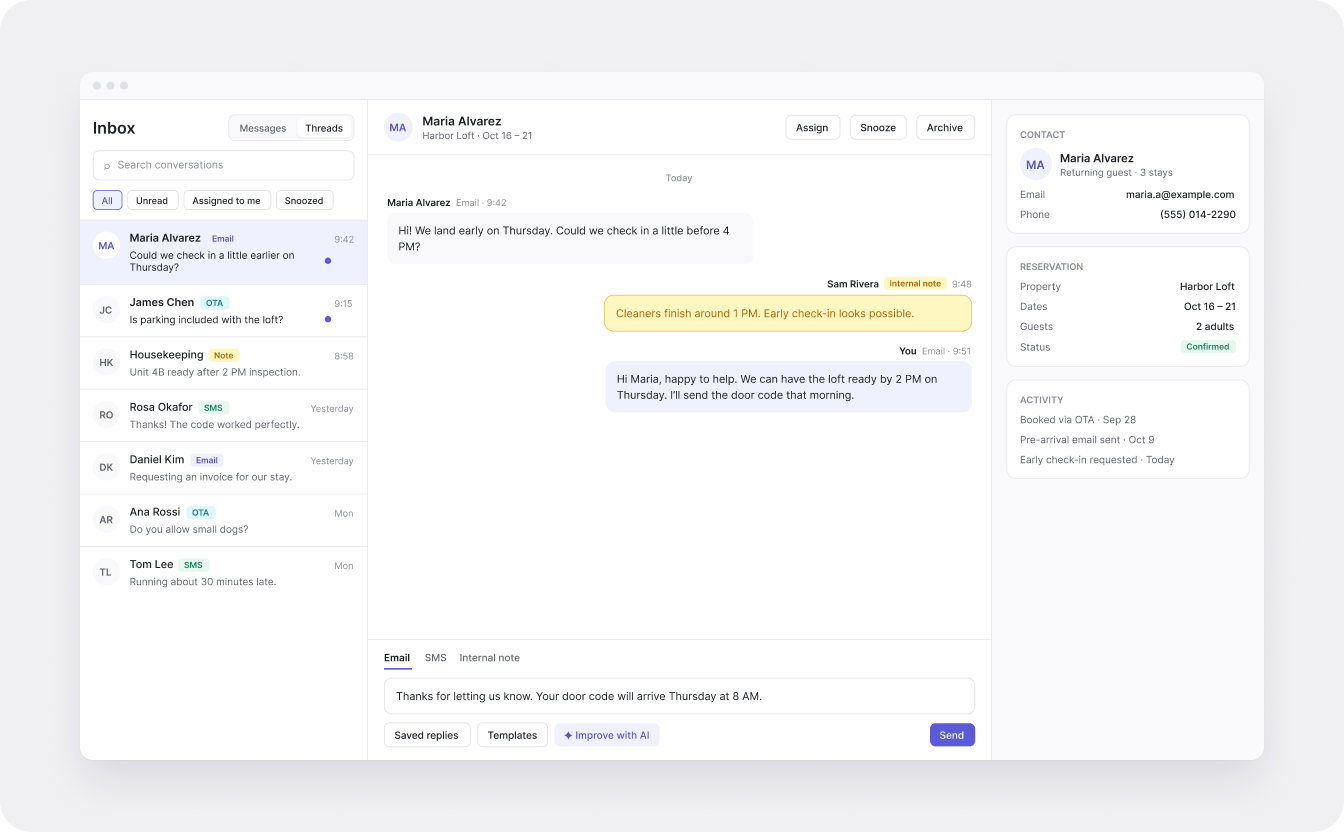
Visuals are original illustrations created for this portfolio and do not depict proprietary product screens.
The market moved to conversations. Daily habits didn’t.
Communication tools have shifted from individual messages to threaded conversations. But the existing message-based workflow was part of people’s daily routine, with established habits and muscle memory behind it. Replacing it outright would have traded one problem for another.
Evolve the product. Keep the workflow.
Instead of replacing the familiar model, the inbox supports both. Message View keeps the message-by-message workflow people know. Threaded View groups communication into conversations. Teams move to the modern model at their own pace, and the product evolves without forcing anyone to relearn it.
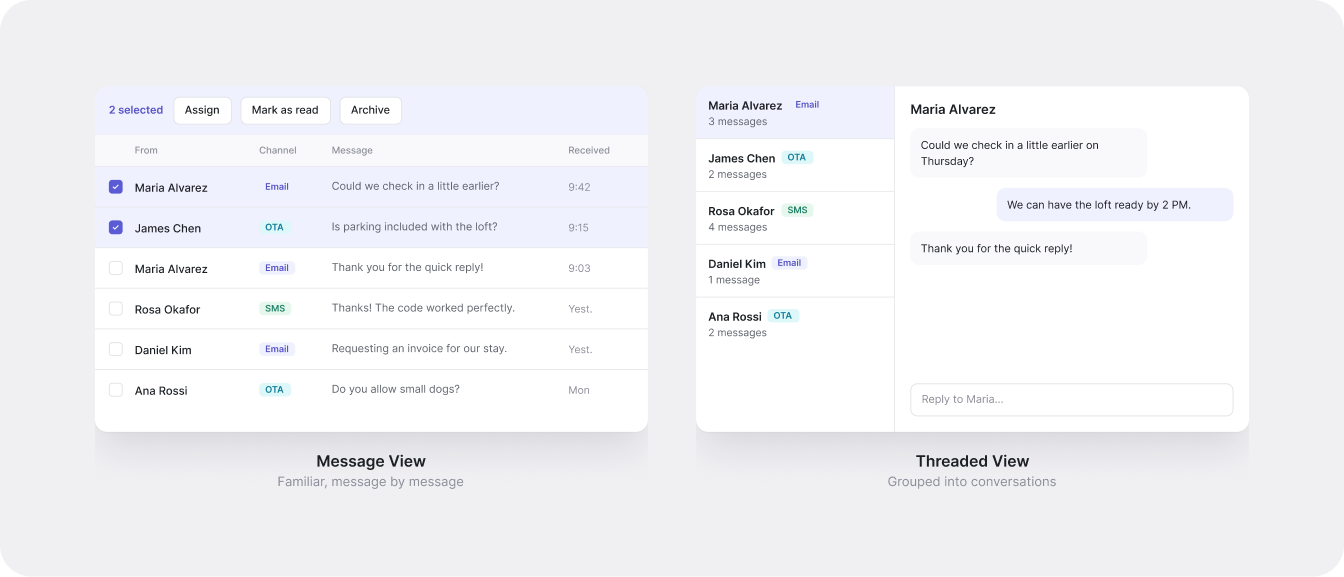
Two interaction models, one inbox.
4
channels in one workspace
2
interaction models
3
panels of context
Every channel. Full context.
Email, SMS, OTA messages, and internal notes live side by side, each clearly labeled. Threaded View uses a dense, three-column layout: the conversation list, the active conversation with its composer, and the contact and reservation details needed to respond, all on one screen.
Depth where daily work needs it
Assignment, search and filters, read and unread, starring, snoozing, pinning, and archiving. Saved replies, templates, and AI-assisted writing. Contact creation and merging, message history, bulk actions, follow-up states, role-based information, and responsive behavior.
AI inside the composer
AI-assisted writing sits where replies are written, not in a separate tool. A rough draft becomes a polished reply, and the person sending it stays in control of what goes out.
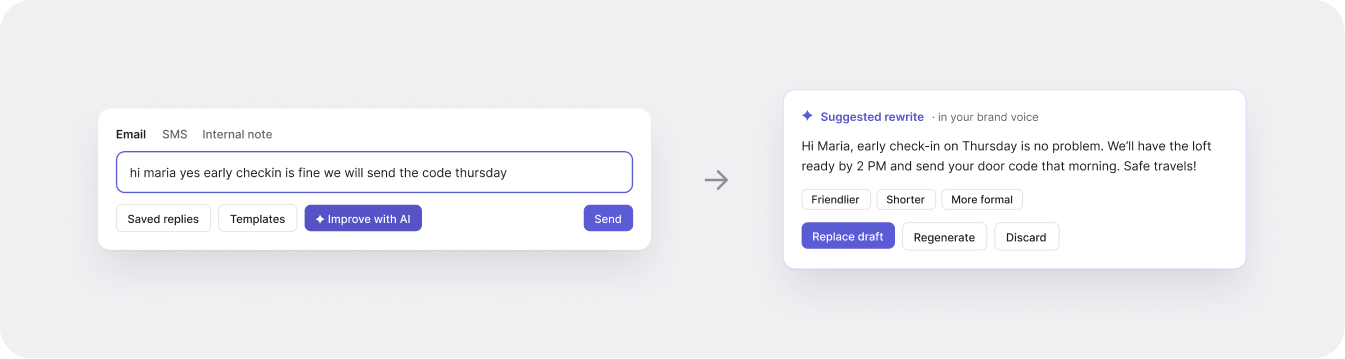
A rough draft, rewritten in the brand’s voice. The sender decides.
The unified view customers asked for
The direction came from clients: they asked clearly for a threaded view, and a group of client beta testers, plus usability sessions where possible, shaped the details. Adoption was strong and the feedback very positive, and keeping Message View meant no one was forced to change how they work.
Leading through direction
I led the Unified Inbox and set its direction, including the decision to support both interaction models. A designer on my team did the hands-on design, working from my direction and reviews.
The strongest product evolutions don’t ask people to forget what they know. They build on it.
Next case study
AI that already knows the business. →

Product design leader. Design functions,
systems, and products for complex SaaS.
© 2026 Alina Dohotaru
Visuals are original illustrations and do not depict proprietary product screens.
← All case studies
Unified Inbox
Two ways to work. One inbox.
A unified workspace for email, SMS, OTA messaging, and internal notes, designed to move the product forward without breaking how people already work.
My role
Design lead: direction and reviews
Team
Me + 1 designer, with product owners
Platform
Web, responsive
Channels
Email, SMS, OTA, internal notes
Visuals are original illustrations created for this portfolio and do not depict proprietary product screens.
The market moved to conversations. Daily habits didn’t.
Communication tools have shifted from individual messages to threaded conversations. But the existing message-based workflow was part of people’s daily routine, with established habits and muscle memory behind it. Replacing it outright would have traded one problem for another.
Evolve the product. Keep the workflow.
Instead of replacing the familiar model, the inbox supports both. Message View keeps the message-by-message workflow people know. Threaded View groups communication into conversations. Teams move to the modern model at their own pace, and the product evolves without forcing anyone to relearn it.
Two interaction models, one inbox.
4
channels in one workspace
2
interaction models
3
panels of context
Every channel. Full context.
Email, SMS, OTA messages, and internal notes live side by side, each clearly labeled. Threaded View uses a dense, three-column layout: the conversation list, the active conversation with its composer, and the contact and reservation details needed to respond, all on one screen.
Depth where daily work needs it
Assignment, search and filters, read and unread, starring, snoozing, pinning, and archiving. Saved replies, templates, and AI-assisted writing. Contact creation and merging, message history, bulk actions, follow-up states, role-based information, and responsive behavior.
AI inside the composer
AI-assisted writing sits where replies are written, not in a separate tool. A rough draft becomes a polished reply, and the person sending it stays in control of what goes out.
A rough draft, rewritten in the brand’s voice. The sender decides.
The unified view customers asked for
The direction came from clients: they asked clearly for a threaded view, and a group of client beta testers, plus usability sessions where possible, shaped the details. Adoption was strong and the feedback very positive, and keeping Message View meant no one was forced to change how they work.
Leading through direction
I led the Unified Inbox and set its direction, including the decision to support both interaction models. A designer on my team did the hands-on design, working from my direction and reviews.
The strongest product evolutions don’t ask people to forget what they know. They build on it.
Next case study
AI that already knows the business. →
Product design leader. Design functions, systems, and products for complex SaaS.
© 2026 Alina Dohotaru
Visuals are original illustrations and do not depict proprietary product screens.
← All case studies
Unified Inbox
Two ways to work. One inbox.
A unified workspace for email, SMS, OTA messaging, and internal notes, designed to move the product forward without breaking how people already work.
My role
Design lead: direction
and reviews
Team
Me + 1 designer, with product owners
Platform
Web, responsive
Channels
Email, SMS, OTA, internal notes
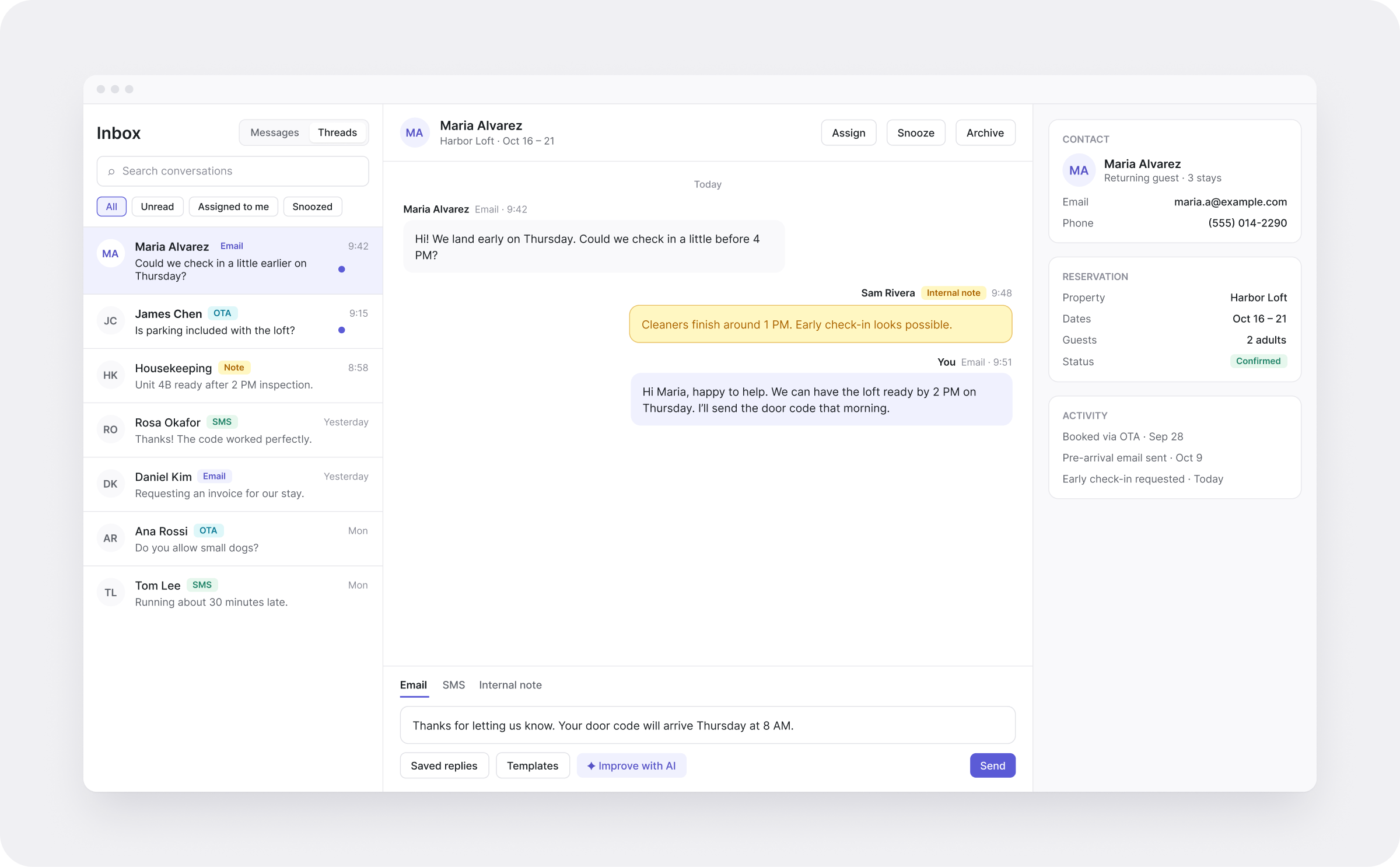
Visuals are original illustrations created for this portfolio and do not depict proprietary product screens.
The market moved to conversations. Daily habits didn’t.
Communication tools have shifted from individual messages to threaded conversations. But the existing message-based workflow was part of people’s daily routine, with established habits and muscle memory behind it. Replacing it outright would have traded one problem for another.
Evolve the product. Keep the workflow.
Instead of replacing the familiar model, the inbox supports both. Message View keeps the message-by-message workflow people know. Threaded View groups communication into conversations. Teams move to the modern model at their own pace, and the product evolves without forcing anyone to relearn it.
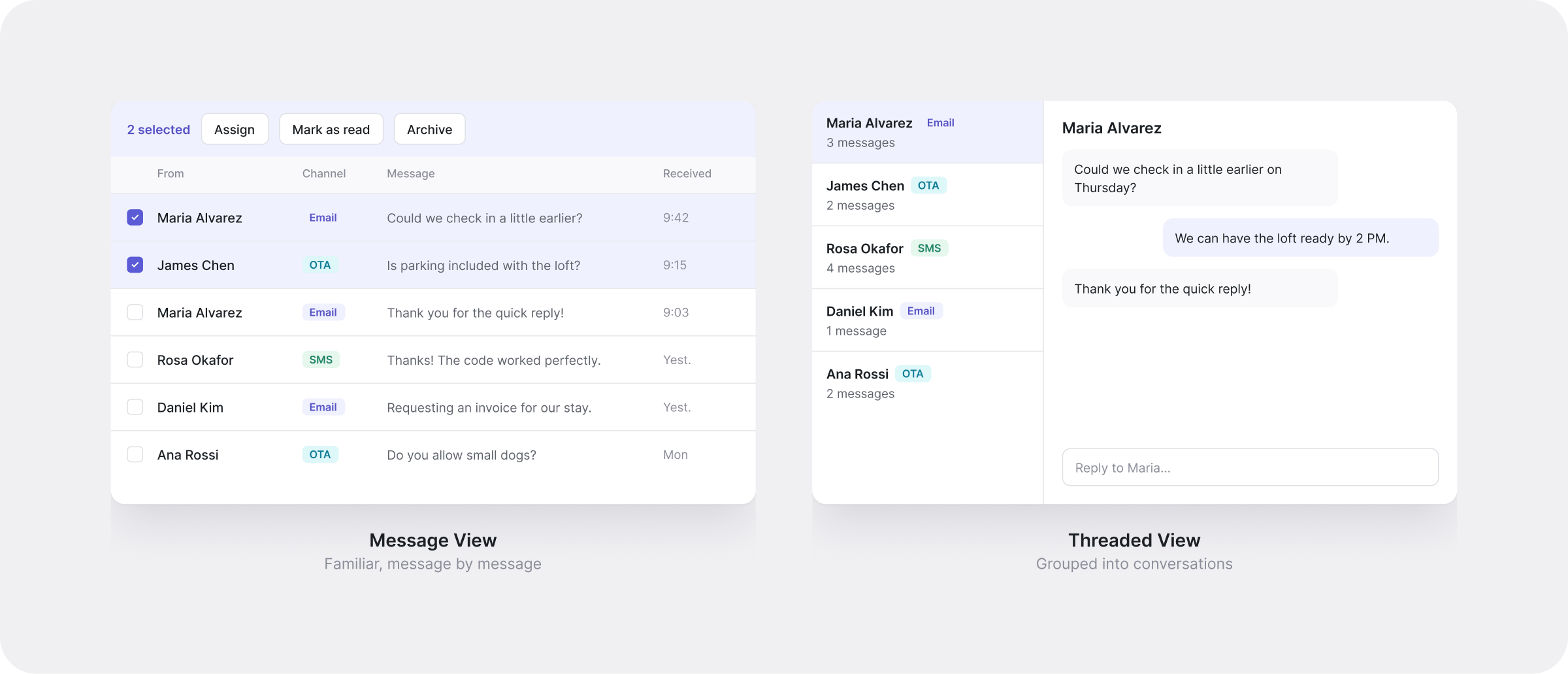
Two interaction models, one inbox.
4
channels in one workspace
2
interaction models
3
panels of context
Every channel. Full context.
Email, SMS, OTA messages, and internal notes live side by side, each clearly labeled. Threaded View uses a dense, three-column layout: the conversation list, the active conversation with its composer, and the contact and reservation details needed to respond, all on one screen.
Depth where daily work needs it
Assignment, search and filters, read and unread, starring, snoozing, pinning, and archiving. Saved replies, templates, and AI-assisted writing. Contact creation and merging, message history, bulk actions, follow-up states, role-based information, and responsive behavior.
AI inside the composer
AI-assisted writing sits where replies are written, not in a separate tool. A rough draft becomes a polished reply, and the person sending it stays in control of what goes out.
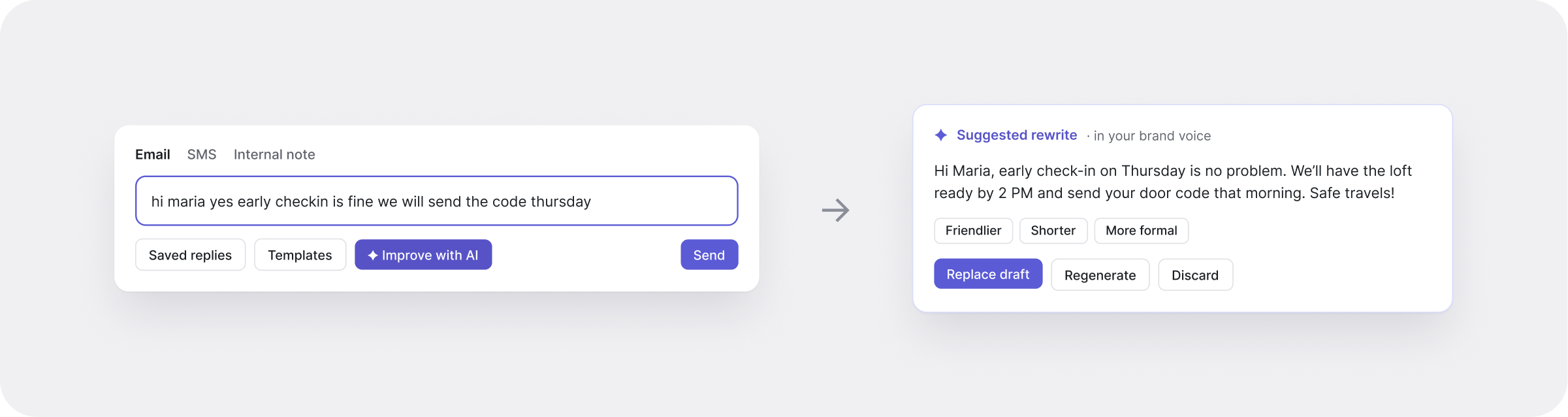
A rough draft, rewritten in the brand’s voice. The sender decides.
The unified view customers asked for
The direction came from clients: they asked clearly for a threaded view, and a group of client beta testers, plus usability sessions where possible, shaped the details. Adoption was strong and the feedback very positive, and keeping Message View meant no one was forced to change how they work.
Leading through direction
I led the Unified Inbox and set its direction, including the decision to support both interaction models. A designer on my team did the hands-on design, working from my direction and reviews.
The strongest product evolutions don’t ask people to forget what they know. They build on it.
Next case study
AI that already knows the business. →
Product design leader. Design functions,
systems, and products for complex SaaS.
© 2026 Alina Dohotaru
Visuals are original illustrations and do not depict proprietary product screens.